Home Top Ad

Responsive Ads Here

As if to temper the cries of "but what are you doing for Sustainability Week, Tim?" across the internet, Mr. Cook's behemoth ...

As if to temper the cries of "but what are you doing for Sustainability Week, Tim?" across the internet, Mr. Cook's behemoth recently filed a patent for uniform battery enclosures – something that might match across your iPhone, your wireless keyboard and your wireless mouse, say – that could allow us to routinely swap batteries between our iOS devices.

If Apple's idea makes it to market, the tech is a solid step towards a more modular, sustainable, planet friendly future, although it's important to note it is an application, rather than a granted patent – and according to stats from Insights, the Cupertino giant files literally thousands of those per year. 

I applaud any push for a future in which we'll be replacing just one small part of our Apple product, rather than canning the whole thing and buying again. You can probably sense there's a 'but' coming though… 

Interchangeable batteries for monitors and so on are a noble idea, but how often have you mused: "I wish I could remove my MacBook Air's battery and use it to charge my iPad"? Now, how often have you thought to yourself: "I wish my AirPods Pro 2 batteries didn't start deteriorating so fast"?
If the second statement resonates, we speak the same language, friend. 

Back to the patent application titled 'battery charging system and mobile and accessory devices' (first spotted by Apple Insider) for a minute though. It features images depicting standardized slots and a relatively traditional-looking battery pack
– a cuboid core, an outer shell, two sensor terminals, positive and negative core terminals at the end – ready to slip into a cell phone, a monitor, a wireless keyboard and a wireless mouse. 

Sadly, no headphones or earbuds are mentioned in the filing and for me, that's the number one Apple item sorely in need of a better shelf life. 

User replaceable Mac batteries are only 'new' if you were born after 2009

Apple's 2009 MacBook 2.13GHz on white background

The 2009 Apple MacBook 2.13GHz was one of the last user replaceable battery products Apple offered  (Image credit: Apple )

Replaceable batteries are hardly a groundbreaking idea. I can't be alone in remembering the deep joy of getting a new Nokia 3310 phone up and running in 1999. It's a task that included releasing a fresh 1,450mAh battery from its little plastic wallet, whipping the back of the handset off with a quick upward flick of the wrist, lining up the three contacts, sliding in the power pack, squishing the whole thing back together again, flipping it back to the screen and firing it up. Just me? And if the 3310's stamina ever dipped (it rarely did; that phone lasted for days) you could simply buy another battery pack and do it yourself. Many of us popped a spare in our rucksacks if we knew we'd be camping at a music festival. Those halcyon days…

If you want to try it today, there's always the 2022 issue Nokia 5710 XpressAudio, which comes with Bluetooth earbuds built into the back or the August 2023 Nokia 130 and 150, all of which sport the self-same 1,450mAh replaceable battery. 

That wasn't the case with the original 2007 iPhone though, was it? In fact, no iPhone has ever come with a battery we get to load in (and update) ourselves; the last time Apple gave us the option of a user replaceable battery in any of its products was 15 years ago, in the 2009 Apple MacBook. 

Light-powered charging for earbuds exists – so can't Apple fix it for AirPods? 

Apple AirPods Pro 2 on a black surface.

It'd be so good if this premium product lasted a little longer  (Image credit: Future)

Can you imagine how many ice-white Apple earbuds have found their way into landfill since they burst onto the scene in December 2016? 

I can do better than that – I'll give you an educated estimate. According to Statista, between 2017 and the end of 2022, Apple sold 391 million pairs of AirPods, which means sales figures are now well over 400 million units (and then some). It's also safe to assume that the 110 million pairs sold between 2017 and the end of 2019 have now passed on to the great big gig in the sky. Why? Because the unpalatable truth is that your AirPods have a finite lifespan (which I'll explain fully later), owing to the batteries that power them. 

But AirPods can be recycled, right – so they won't all be in landfill? I reached out to Apple over this, because it has been suggested that perhaps it wouldn't be financially viable for Apple to actually repurpose old AirPods as part of its Recycling Program, when safely opening the driver housings to extract their delicate components is a skilled task requiring actual human hands, rather than machines. So let's clear that up.

Apple responded to my query regarding what happens to an AirPod when a customer uses its recycling program with some useful background information, telling me, "Components of AirPods are separated by our recyclers and recycled. Our Material Recovery Lab in Austin, TX, is dedicated to discovering innovative recycling solutions across Apple’s products."

Apple's entire response is as follows: 
"Apple AirPods Pro (2nd Gen) are better for the environment. 

– AirPods Pro are designed with numerous materials and features to minimise their impact on the environment, including the use of 100% recycled rare earth elements in all magnets and 100% recycled gold in the plating of multiple printed circuit boards. The case also uses 100% recycled tin in the solder of the main logic board and 100% recycled aluminium in the hinge. AirPods Pro (2nd generation) are free of potentially harmful substances such as mercury, BFRs, PVC, and beryllium. 

– Redesigned packaging eliminates the outer plastic wrap, and 90 percent or more of the packaging is made using fibre-based materials, bringing Apple closer to its goal of completely removing plastic from all packaging by 2025. 

– AirPods are built to be long-lasting, if a customer ever has an issue, they should visit an Apple store or an authorised service provider or call Apple Care for assistance. 

– If a customer is having issues with their AirPod’s battery and it is no longer under warranty, the battery service option allows a customer to have each AirPod serviced for a cost. 

– Through our battery program for AirPods, we'll replace the user’s AirPods and then send the previous ones back to a facility where we can make sure they are properly recycled.  

– Components of AirPods are separated by our recyclers and recycled. Our Material Recovery Lab in Austin, TX, is dedicated to discovering innovative recycling solutions across Apple’s products. 

– As with all of our products, we work closely with our recyclers to ensure AirPods are properly recycled and provide support to recyclers outside of our supply chain as well.

– Although AirPods do not qualify for trade-in value, they are accepted as part of the recycling program for free. You can take your old small electronic equipment such as smartphones, tablets, computers or batteries to any Apple Store and we’ll recycle them responsibly and free of charge.

– AppleCare+ for Headphones which includes AirPods provides up to two years of expert technical support and hardware coverage for AirPods, including unlimited incidents of accidental damage protection, each subject to an excess fee of £25 (or $29)". 

So, although the various plastics in your AirPods are not biodegradable (they simply won't go back to nature), Apple says it is making great strides here. Now, Apple's earbuds aren't alone in that people might be throwing them away rather than using Apple's recycling solutions, (other true wireless plastic earphones are available, just see our best earbuds and best noise-cancelling earbuds buying guides), but unlike Apple, certain top manufacturers are implementing more planet-friendly charging systems in a bid to avoid recycling programs – because ideally, their innards wouldn't expire. 

Urbanista Los Angeles

Urbanista Los Angeles can charge using light – yes, even on a snowy day  (Image credit: Truls Steinung)

Case in point: Urbanista's relationship with Powerfoyle, which started making headlines back in 2021 as the future of sustainable sound. Powerfoyle is a material developed in partnership with sustainable energy company Exeger, which converts any light – from both outdoors and indoors, ie. from the sun and from lightbulbs – into energy that can power our electronics. And the ideal user case is true wireless headphones. 

“With headphones charged by light, we resolve a major pain point that consumers feel about their batteries not being charged,” Anders Andreen, CEO of Urbanista, said nearly three years ago, adding, “more importantly, we shift the energy consumption into sustainable energy".

To date, the Urbanista Malibu, the Urbanista Los Angeles (pictured above) and Urbanista Phoenix (the first ever light-powered earbuds) all use Powerfoyle for charging – and there are also Powerfoyle-toting options from House of Marley, Adidas' RPT-02 SOL and Philips' A6219 GO too. So what on this, Apple? 

Apple's representative told me that Apple never talks about its future plans/unreleased products, so there's nothing to share there. And fair enough – we can still hope. 

Here's why AirPods don't last – and why we need to rethink our outlook 

As I previously noted, Apple has sold well over 400 million pairs of AirPods to date. And all of those will expire. I don't like it (I'm an audio specialist; I write about this stuff every day and the AirPods Pro 2 are a very talented set of earbuds) but the fact remains: even your $249 / £249 / AU$399 AirPods Pro 2 will give up the ghost, sooner or later. 

How long do AirPods last precisely? Honestly, it's a tough call, because factors such as how often you use them, how frequently you charge them (which is actually as detrimental to battery health as leaving them plugged in overnight is – we know this from our phones, don't we?), whether you get them especially sweaty at the gym, how often you make calls or listen with ANC (both of which drain the battery rather quickly, thus requiring more charging) and even how often you clean your earbuds all affect a battery's longevity. 

Make no mistake though, the batteries in your AirPods and earbuds will deteriorate over time. You can treat your AirPods with all the due care and respect in the world to eke as much life out of them as possible, but you cannot stop their inexorable demise any more than you can halt the passing of time. Why? A layer of crystalline buildup will slowly coat the tiny lithium-ion battery’s inside walls, thus increasing electrical resistance. Over time, the result is a reduction in the amount of charge said batteries are able to hold, even at 100% capacity. On top of this, the batteries in your earbuds lose charge over time just by sitting there. Ever found an old pair of earbuds in a pocket and found they no longer switch on when you flip the case? That. 

Again, Apple isn't alone here, this is an issue with the batteries found in every set of true wireless earbuds I've tested to date. 

Urbanista Phoenix wireless earbuds

The earbuds look very much like AirPods, but the case… is a little bigger  (Image credit: Urbanista )

Why aren't more companies jumping on the Powerfoyle bandwagon and sidestepping batteries all together? In our largely glowing four-star review of the Urbanista Los Angeles, we quipped, "don’t doubt the efficacy of the charging system here. Or how smug it’ll make you feel", so believe us when we tell you that in headphones, it works. 

Of course, profit margins are always an issue, but size is too. The reason earbuds manufacturers opt for rechargeable, non-replaceable batteries is almost certainly as simple as 'it makes the earbuds smaller'. I'm as guilty as the next person when it comes to seeking out the best earbuds for small ears – my current pick for the best earbuds for my own bijou ears is the Sony LinkBuds S. A quick glance at the Urbanista Phoenix shows that the case is where the solar/ambient light panel is, and said case is not small… 

Ultimately, we need to have a rethink, people. It's too easy to throw out your dying earbuds, select a new set and think no more on it. We need to ask ourselves how much we want ever-smaller, ever cuter 'fast fashion' style earbuds and how much we want a sustainable future – for our listening gear and for future generations. 

You may also like


from TechRadar - All the latest technology news https://ift.tt/ibNHj8Y

The Google Pixel 9 is expected to show up around October time, and newly leaked photos have arrived to show off the flagship handset from ...

The Google Pixel 9 is expected to show up around October time, and newly leaked photos have arrived to show off the flagship handset from all angles – and at the same time we've also got a predicted price for the Google Pixel 8a.

First up the pictures, from Russian site Rozetked (via Android Police) – and you can see how the rear camera bar has become a rear camera island. The corners are more rounded, and the sides are flatter, compared to what we saw with the Google Pixel 8.

As always with leaks, we need to be cautious when assessing the authenticity of these images, but the device on show here does match up with unofficial renders that have previously made their way on to the web.

While the tweaked look may not be to everyone's tastes, this is still recognizable as a Pixel phone, thanks to that wide camera island. We can also see the USB-C port, the usual power and volume buttons, and a SIM tray slot at the bottom of the device.

A pricier mid-range handset

Google Pixel 7a review front angled perspective sticky notes

The Google Pixel 7a launched in May 2023 (Image credit: Future | Alex Walker-Todd)

Next up there's the price leak for the Pixel 8a, which comes via PassionateGeekz (and Notebookcheck). This isn't a source we've heard a lot from in the past, so again take this as an unconfirmed rumor for the time being.

Apparently, retail listings in Canada put the price of the 128GB version of the Pixel 8a at CA$708.99, while the 256GB edition comes in at CA$792.99 – backing up previous rumors that the mid-range handset is going to go up in price this year.

Now Google won't use standard currency conversions for its global pricing of course, but for reference that works out as $515 / £415 / AU$805 for the cheaper variant and $575 / £465 / AU$900 for the more expensive one.

The Google Pixel 7a originally went on sale for $499 / £449 / AU$749, and CA$599 in Canada, so a pretty substantial price hike could be in the offing. We'll most likely see the Pixel 8a unveiled at the Google I/O 2024 event on May 14.

You might also like


from TechRadar - All the latest technology news https://ift.tt/XpHLRh5

Microsoft has deployed a new preview build of Windows 11 to the Canary channel (which is the earliest testing outlet) and it does some wor...

Microsoft has deployed a new preview build of Windows 11 to the Canary channel (which is the earliest testing outlet) and it does some work on the widgets panel that could be divisive.

This is build 26200 and there’s only a handful of changes applied here, two of which pertain to widgets.

The main thrust of innovation here is Microsoft’s new idea to allow developers to send notifications from their widgets to the taskbar button. In other words, when something happens with a widget that you might want to see, it’ll be waving at you from the taskbar to let you know.

Of course, not everyone will want their widget button in the taskbar to act in this way, and fortunately, Microsoft has included an option to turn off this behavior.

It’s also worth noting that this is a limited rollout to begin with, and indeed, most people won’t see these widget notifications yet – only those in the European Economic Area (EEA) are getting this feature in testing. Of course, that rollout could be made broader down the line, depending on feedback.

Another tweak related to this in build 26200 is that Microsoft is changing said widgets button to make the icons on the taskbar clearer.

Elsewhere on the taskbar, another icon is changing, this time the energy saver icon which resides in the system tray (on the far right). A few months back this was changed in testing to look different for desktop PCs plugged into a power socket, but now Microsoft has decided to revert it to the old look (a leaf icon).

Finally, Microsoft notes that there is an odd known issue with this preview build – and others, in the Dev and Beta channels, too – whereby Copilot is auto-launching itself after the PC is rebooted.

The software giant explains this is not related to the automatic launch on boot behavior that has been tested in preview builds before, the rollout of which has now stopped, apparently, since March (though we heard it has been restarted elsewhere).

This is a separate glitch, then, and Microsoft says it hopes to have a fix implemented soon. Meanwhile, greater visibility for Copilot is something the company is certainly driving forward with, to no one’s surprise.


Analysis: A livelier taskbar won’t be everyone’s preferred beverage

Are notifications for widgets intrusive? Well, yes they could certainly be regarded in that way, but as noted, as long as the option is provided to turn them off, it’s not too big a deal. If you want them, you can have them – if not, hit that off switch. Fair enough.

Many people likely won’t want their widgets effectively waving their hands at them from the taskbar, whenever something new pops up with a widget in the panel. This taskbar-based hand-waving appears to be a direction Microsoft is exploring in more depth, though. We’ve also recently seen an idea where the Copilot button runs an animation with its icon to draw your attention to the fact that the AI can help with something you’re doing on the desktop.

This only relates to copying text or image files currently – again, in testing – but in this case, there’s no way to turn it off.

All this could possibly point to a taskbar which is considerably livelier and more animated in the future, perhaps – and again, that’s not something everyone will appreciate.

If this is the path we’re going down for the taskbar as we head towards next-gen Windows (which might be Windows 12), hopefully Microsoft will also give Windows users enough granular control over the bar’s highlighting features and animations so they can be dialed back suitably.

You might also like...


from TechRadar - All the latest technology news https://ift.tt/KoUzCit

Vinyl records are doing incredible numbers. Sales of LPs are at their highest level since the 1990s after 16 consecutive years of climbing ...

Vinyl records are doing incredible numbers. Sales of LPs are at their highest level since the 1990s after 16 consecutive years of climbing sales, and it's no wonder why – vinyl records don't just sound good, they're wonderfully visual and tactile things too. 

As much as we love the best music streaming services, there's something about selecting a record, putting it on one of the best turntables and putting the needle on the record that's much more satisfying than clicking an icon on your phone. And you can't show off a Spotify subscription by placing it prominently on a shelf.

If you've been thinking about joining the fun but don't have a turntable, we're here to help. Whether you're a budget buyer or want to spend big bucks, here's how to find the perfect turntable for you this Record Store Day.

1. What do you want to spend?

You can spend a lot of money on a turntable. Think of a really big number and it's likely that there are turntables that cost even more than that: some high-end turntables will set you back five figures. But there are lots of very affordable options too, and our current budget pick – the Audio-Technica AT-LP60XBT – is less than $200 / £200 AU$300. 

So before you set out to read up on spec sheets, features, drive types and more, it's important to decide how much you're willing to spend. Don't forget that the records you'll be playing can be expensive too. There's no point having a brilliant turntable if you can't afford any records to play on it. As a rule of thumb, under $100 / £100 / AU$200 is where you'll find the most basic turntables; they're fine, but you may well outgrow them relatively quickly.

An Audio-Technica turntable on a bookshelf

(Image credit: Audio-Technica )

Moving up a bracket, turntables in the $100 / £100 / AU$200 to $400 / £400 / AU$500 range are where you'll find the best entry-level models and mid-range ones too. There's lots of choice here, and lots of well-loved brands as well as interesting new manufacturers. And most importantly, the sound quality here will usually be way beyond what the sub-$100 / £100 / AU$200 models can deliver.

By all means go beyond $400 / £400 / AU$500 if you can and want to, but you're in premium territory now. The turntables in this price bracket are wonderful, but they can also be a lot more complex and you don't need to spend quite so much for your first spins.

2. What do you already have?

Do you already have an amplifier and the best wireless speakers, or are you starting from scratch? If it's the latter then you'll need to also get an amp and speakers, or consider going down the Bluetooth route instead. 

A turntable with a person's hand

(Image credit: Pro-Ject )

Some turntables now come with Bluetooth, which enables you to stream wirelessly to hardware such as smart speakers and the best Bluetooth speakers. The sound quality isn't as good as you'll get from a decent hi-fi (although the most recent, more premium turntable models with aptX HD sound pretty fantastic) but if you're short of space, cash or both and already have good quality Bluetooth speakers it's a very convenient option. 

It's also less stuff to move if you're in accommodation such as student or shared apartments from which you're likely to relocate in the near future.

3. What do you want to play?

Turntables usually come with a choice of playback speeds: 45rpm for seven-inch records (singles, EPs and flexi-discs) and 33 and 1/3 rpm for twelve-inch albums. Twelve-inch singles play at 45rpm. The older 78rpm speed is a pretty rare option these days, but if you want to play vintage singles you may need that option too. 

If your records include some valuable ones or limited edition ones, it may be wise to avoid really cheap turntables. A good turntable requires a lot of careful engineering, especially around the tonearm. That's the long arm that holds the stylus cartridge, and which moves towards the centre as the record plays. A poor quality or badly designed tonearm or stylus can risk damaging your records. 

Pro-Ject Juke Box E1

(Image credit: Pro-Ject)

If the tonearm is too heavy, or is weighted in such a way that it applies too much force, that can cause extra wear and tear on the records and on the stylus too. Some wear and tear is inevitable, because putting a needle on a record creates friction, but you don't want to create more wear than necessary. And if the tonearm is too light or has insufficient force applied, the stylus may skip across the grooves and cause scratches. 

The key here is what's called tracking force, which is how much downward pressure the tonearm puts on the stylus when it's in the groove of the record. Turntables that have a counterweight enable you to adjust that force, which is also really important if you change the stylus cartridge in the future: different cartridges, even from the same manufacturer, often require different tracking force settings. 

Another protective feature that tends to be missing from really cheap turntables is anti-skate. This applies a slight horizontal pressure to the tonearm; without it the tonearm really wants to skate to the centre of the record as it plays. Without anti-skate it can be harder for the turntable to minimise distortion, wear and deliver good stereo sound. Some turntables' anti-skate system is adjustable via a small knob; others are pre-set.

4. Do you want an all-in-one?

When it comes to convenience you can't beat an all-in-one that combines turntable, amp and speakers in a single unit. But what you gain in convenience you might lose in audio quality and you definitely lose in expandability: few all-in-ones have components that you can upgrade in the future, and many are made with comparatively poor quality parts that are likely to limit your audio enjoyment. 

the victrola premiere v1 turntable

(Image credit: Victrola)

The most flexible and future-proof system is made from separates where you can upgrade or replace your turntable, your amp or your speakers later on.

5. Do you need a phono stage?

If you'll be connecting your turntable to a hi-fi system you'll need to have what's called a phono stage either in your amplifier, in your turntable, or as a stand-alone bit of hi-fi hardware between the two. 

A phono stage amplifies the signal from your records so it's strong enough for the amplifier to do its thing and send the sound to your speakers. If you're planning to go without an amplifier and connect directly to a set of powered speakers, you'll almost certainly need a phono stage in your turntable or to add a stand-alone one. 

Brian Eno's Turntable II

(Image credit: Paul Stolper Gallary)

If you're planning to only stream from a Bluetooth-enabled turntable you don't need a phono stage, as there will be one built-in to process the signal before it's sent to the Bluetooth transmitter.

Not sure whether your amplifier has a phono stage? If it has one it will have inputs labelled "phono" around the back and a matching phono option on its input selector. 

If your turntable and amplifier both have phono stages, you don't want to use both of them: that'll turn the signal up too much and make it distort. Some turntables enable you to turn off the phono stage with a simple switch, but if not you'll need to connect it to the normal analogue inputs rather than the phono ones. As much as we love distortion in music, doubling up on the phono stage delivers a very wrong kind of distortion that's really quite unpleasant.

6. Are you confident about buying second hand?

Cambridge Audio Alva TT V2 on sideboard, with man placing a record on the turntable

(Image credit: Cambridge Audio)

Second hand turntables can save you a lot of money, and can make previously unaffordable models affordable. There are lots of good ones out there at good prices from people who've upgraded their existing systems. 

But equally, there are lots of bad ones too. If you haven't owned a turntable before, or don't feel confident in assessing the quality of a potential second-hand buy, we'd recommend sticking with new: that way you're getting a warranty and other customer protection.

7. Do you want a belt drive or direct drive?

The Lenco L-3810 turntable

(Image credit: Lenco)

In order to spin the platter, turntables are either connected to it via a rubber belt – a belt drive – or directly to the platter – direct drive. Many but not all high-end turntables are direct drive.

Belt drives tend to be quieter in terms of the mechanical noise they generate but the belts will need replaced from time to time. Direct drive effectively lasts forever, but the downside is that it can produce more vibration. That vibration can be apparent with budget models that lack the advanced engineering of their more expensive direct drive rivals. 

8. Do you want your turntable to do everything?

Majority Moto

(Image credit: Majority)

The next choice is whether you want a manual turntable or an automatic one. A manual one requires you to lower the tonearm onto the record when you want to play it and to remove it when you reach the end of the record. An automatic turntable does both of those things for you. It's like the difference between a manual (stick) car and an automatic one.

This one's really about personal preference (and price: fully automatic turntables are slightly more complex and therefore can cost a bit more), but if you can't decide then consider semi-automatic: that still requires manual operation but will lift the tonearm and stylus for you at the record's end.

9. Who you gonna call?

Victrola Automatic with two speakers, in a study with a painting behind it

(Image credit: Victrola)

There is an impressive amount of turntable advice out there, much of it very good. We would of course recommend our very own guide to the best turntables, which is regularly updated with expert insight from our resident vinyl fanatics. And there are lots of great blogs as well as plenty of helpful folks on Reddit's r/turntables and r/budgetaudiophile subreddits too. 

You might also like


from TechRadar - All the latest technology news https://ift.tt/UiACgIJ

This week in the world of tech: Boston Dynamics unveiled a new robot, and while it terrified us, the barrage of negative Humane AI Pin revi...

This week in the world of tech: Boston Dynamics unveiled a new robot, and while it terrified us, the barrage of negative Humane AI Pin reviews showed us that maybe the artificial intelligence uprising is perhaps further aware than we initially feared.

But maybe you’ve missed these or other major tech stories from this past week. No worries, because we’re here to help with a round-up of the eight biggest tech news stories from the last seven days.

There’s a lot to catch up on, so let’s get into it.

8. The Humane AI Pin came… and flopped

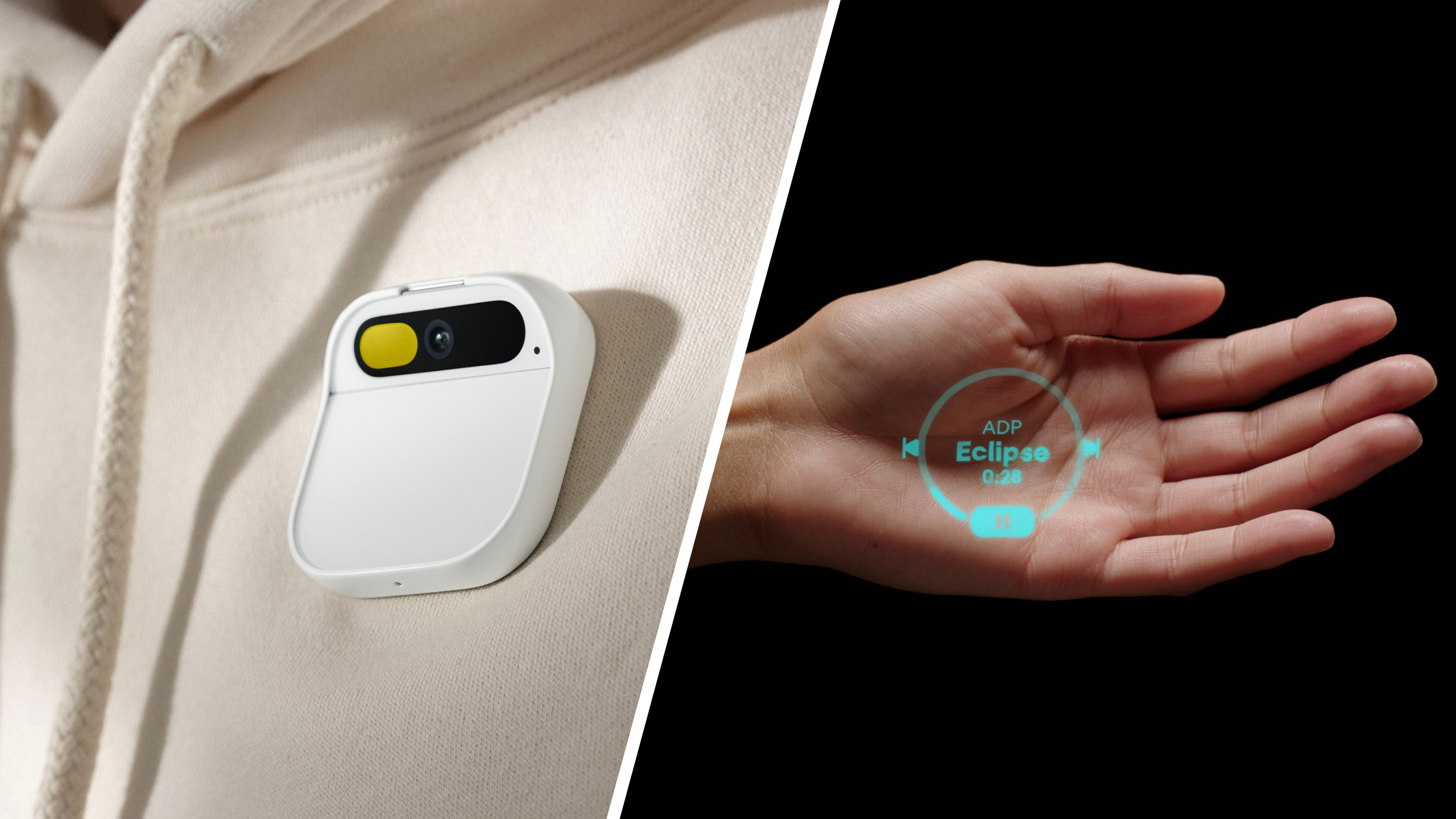
The Human AI Pin on a hoodie and a hand showing its laser projector

(Image credit: Humane)

Reviews for the first Humane AI pin came out this week, and they weren’t great – with the wearable being universally labeled as “unreliable.”

Marques Brownlee released a video on his YouTube channel calling the AI gadget “the worst product i've ever reviewed... for now,” Mrwhosetheboss said "It's not good," Bloomberg said “"The design and interface are fatally flawed," and The Verge’s video interview featured frequent bouts of hysterical laughter because of how bad it found the Humane AI Pin to be.

There was also a very strange controversy on social media criticizing the critics – with much of the undeserved hate being directed at Brownlee, leading to him issuing a response – but the main thing was that while AI wearables do seem to be the future – with Ray-Ban Meta Smart Glasses getting Meta AI and the Nothing earbuds getting ChatGPT (more below) – the current tech isn’t where it needs to be right now. 

7. Boston Dynamics terrified us with its new humanoid robot

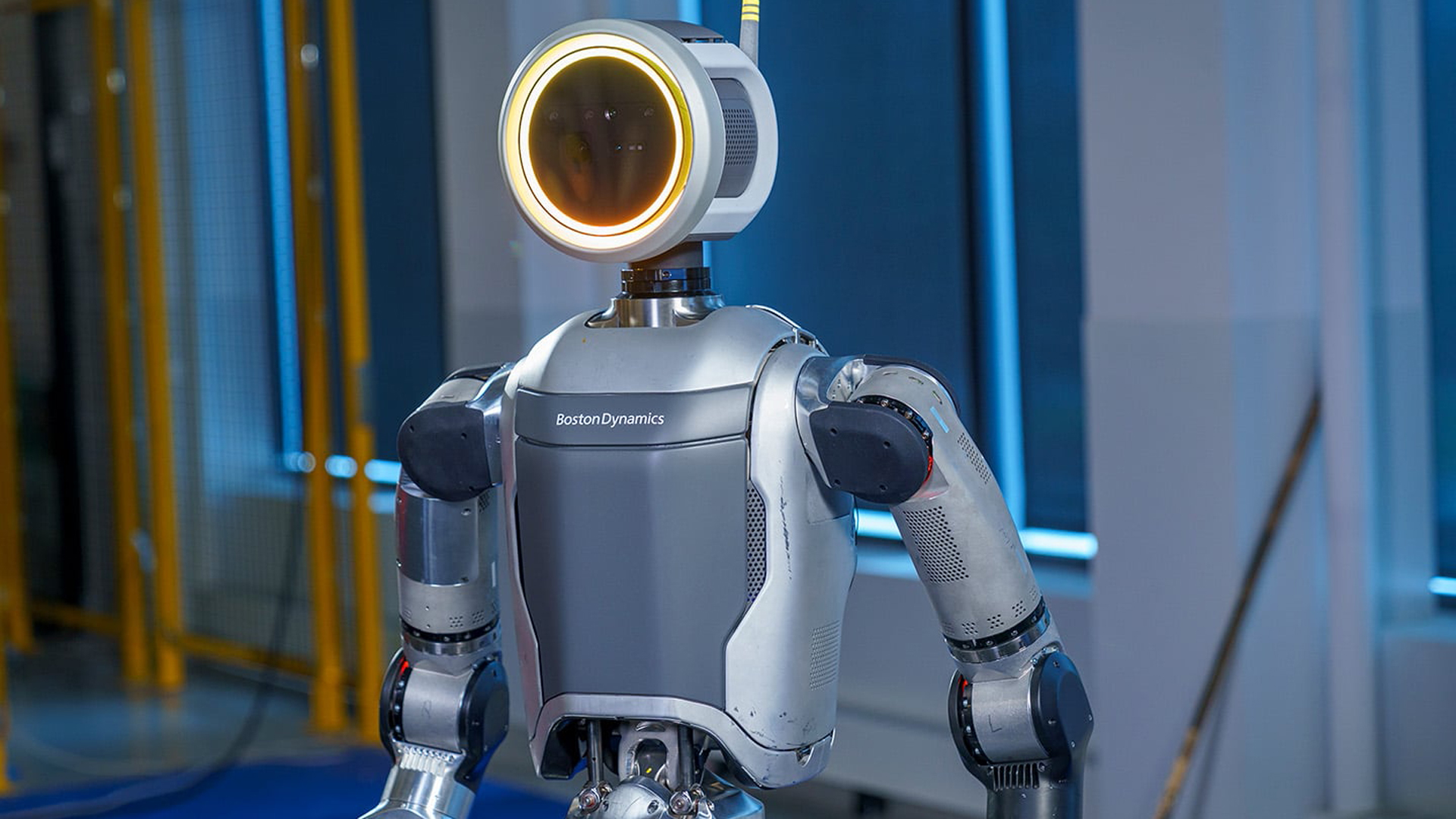
Boston Dynamics All New Atlas

(Image credit: Boston Dynamics)

Perhaps someday we’ll ask, “Where were you when you first saw “New Atlas?” 

Boston Dynamics all-new and all-electric Atlas update is a generational leap from the more than decade-old hydraulics-based Atlas. That robot, which is being retired was amazing in its own right, capable of doing numerous human-like tasks like walking, running, bending, and lifting, but also showing us how an apex human could perform through various acrobatics and parkour antics.

New Atlas, however, might be even stronger and it’s already showing us its uncanny flexibility in a brief introduction video. Expect to see it doing even more impressive physical tricks before the bot finally makes its way to factories and, maybe someday, our homes.

6. We saw Sony’s new mini-LED TV backlight tech put OLEDs on notice

Sony Bravia 9 backlight demo showing images on screen and on raw backlight

(Image credit: Future)

Sony just launched its new 2024 TVs, and the Bravia 9 mini-LED leads the lineup. Positioning mini-LED as its flagship TV tech is an extreme about-face for the company, which had previously reserved that status for OLED.

We saw the new Bravia 9 TV in action at Sony Pictures Studios in Culver City, California, and there’s good reason for Sony’s newfound mini-LED enthusiasm. The company has developed a new XR Backlight Master Drive backlight design that uses a 22-bit LED driver to deliver 50% higher brightness and 320% more local dimming zones than its previous X95L mini-LED model.

This new backlight helps enhance contrast and color brightness while reducing blooming, closing the picture quality gap between mini-LED and OLED. It’s also better able to capture the full range of highlight detail in movies with high dynamic range – an important factor as movies increasingly get mastered at higher brightness levels.

5. Samsung confirmed its AI is coming to your Galaxy 21 phone

Samsung Galaxy S21 Plus

(Image credit: Future)

Samsung has not only teased that Galaxy AI features are coming to the Galaxy S22 series soon, but it seemingly revealed this week that its 2021 flagship phones will get a couple of Galaxy AI tools too.

Per a post on Samsung’s Korean community forum the Galaxy S21, Galaxy S21 Plus, Galaxy S21 Ultra, Galaxy Z Flip 3 and Galaxy Z Fold 3 will be getting the company’s AI-packed One UI 6.1 update in “early May,” and when it does it’ll bring Circle to Search and Magic Rewrite to these devices.

It’s always great news to hear older handsets will be getting some of the technical bells and whistles of the newer smartphone releases, though if you’re rocking a Samsung handset from 2020 it looks unlikely you’ll get any of these AI tools – so we’d suggest checking out our Samsung phones deals page if you’re thinking of upgrading to a new phone that can access Galaxy AI.

4. New Nothing Ear buds launched with ChatGPT

Nothing Ear (a) earbuds in their case, with a frog inexplicably climbing the case

(Image credit: Nothing)

Nothing’s naming strategy is anything but self-explanatory, so to avoid supplementary confusion: Nothing launched two new sets of true wireless earbuds on Thursday, April 18. A model called just Ear are the company’s new flagship offering – these have arrived after the Ear (1), Ear (Stick) and Ear (2), that’s just how it is – while the also-new Ear (a) are the cheaper pair. And it’s this entry-level model that just gained a highly coveted TechRadar five-star recommendation, which you can read about to your heart’s content in our full-fat Nothing Ear (a) review.

But the fact that there are two new sets of Nothing earbuds is only part of the news here, because in addition to releasing two new earbuds models, Carl Pei’s startup has also fixed it so that your Nothing earbuds and phones can let you talk to ChatGPT for instant AI support. 

Nothing says that once you’ve downloaded the ChatGPT app on your Nothing Phone (running the latest Nothing OS), you’ll be able to pinch-to-speak using the earbuds’ stems and thus summon the chatbot for answers, without having to dig out your device. And have to admit, that’s really something, Nothing…

3. Meta rolled out its new AI – and it might bury Google and Microsoft

The Meta AI logo

(Image credit: Meta)

Meta’s AI got a new and improved website, as well as some upgrade thanks to it’s new “state-of-the-art Llama 3 AI model” according to CEO Mark Zuckerberg – and the best thing of all is it’s completely free to use.

The site lets you generate text and images with a written prompt – though to make AI images you'll need to log in and your picture will feature a watermark which should help a little in cutting down misuse.

It’s still early days in the battle between AI creators, but Google and OpenAI had better watch out because Meta’s new and improved software is already looking like a major competitor to what’s currently out there – and it will only get better.

2. The iPhone got its first Nintendo emulators and alternative app stores

AltStore app store

(Image credit: AltStore)

Following some gentle arm-twisting from the EU, Apple recently said its App Store would soon allow retro game emulators like the ones you can find on Android. This week, we saw the first one arrive with Delta – a free app that you can download now from the App Store in the EU and many countries outside of it.

Unlike rival emulators like iGBA, which quickly disappeared from the App Store due to copyright violations, this one is likely here to stay. Delta supports several consoles including the NES, SNES, Game Boy Advance and Nintendo DS, and you can play games with iPhone-compatible controllers, too. All you need to do is provide the ROM files (as long they’re copyright-free, of course) and you’re good to go. Now all we need is a PS1 emulator…

1. The Insta360 X4 became our new favorite 360 camera

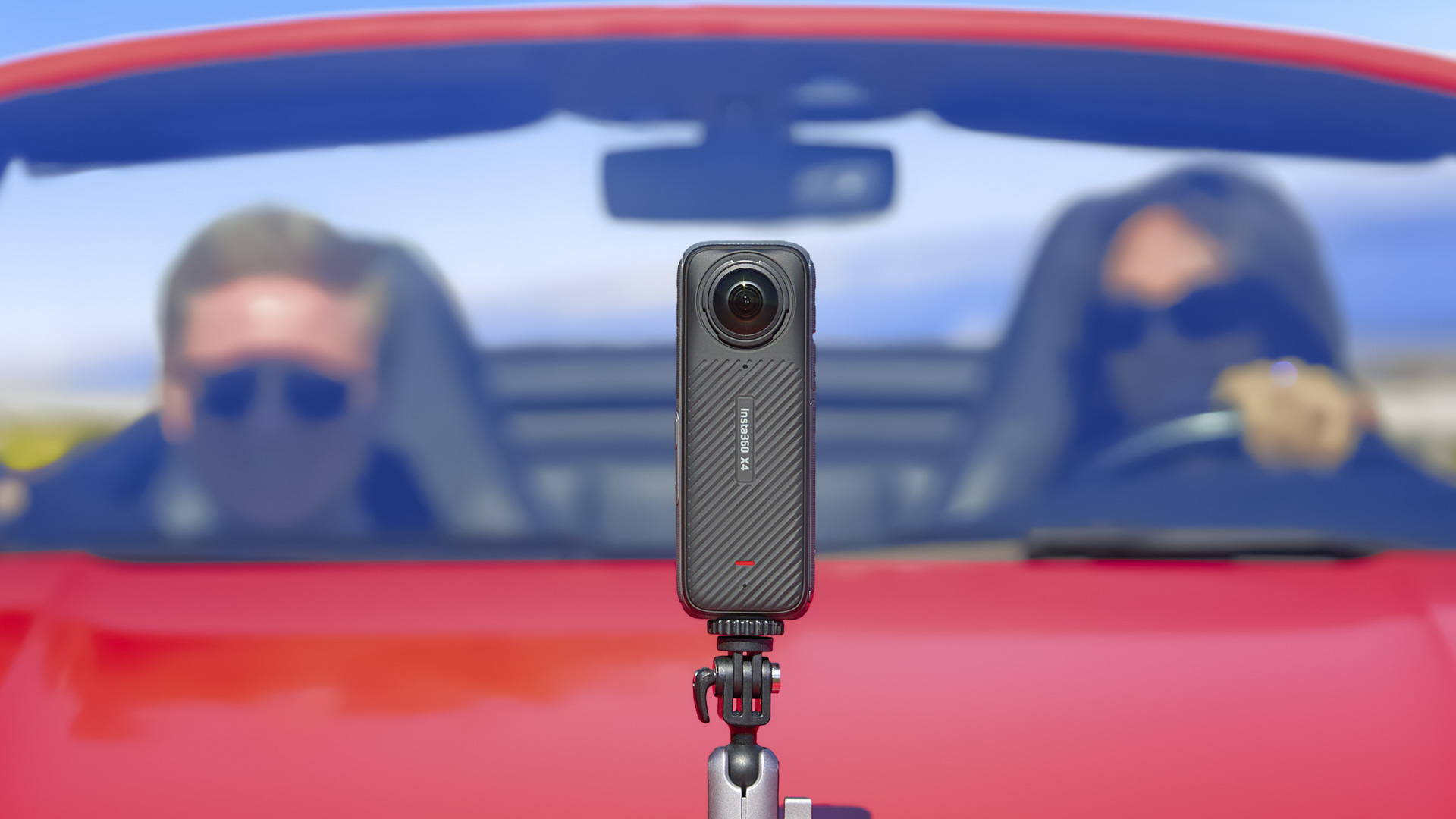
Insta360 X4 360 degree camera mounted to a red convertible car's bonnet

(Image credit: Insta360)

Our extensive Insta360 X4 hands-on review waxed lyrical about the 8K video-equipped 360-degree camera. With higher resolution video than the X3, much better battery life and welcome design tweaks, the X4 is the best 360-degree camera yet.

Full waterproofing and a decent single-camera mode make the X4 a compelling action camera, vlogging tool, and even a dash cam especially for motorcyclists who can voice command the X4 from a Bluetooth compatible headset from within a helmet. GoPro has a tough act to follow with its upcoming Max 2, as does Canon with its intriguing 360 / 180 3D Powershot concept. It’s been really quiet in this category of cameras the last couple of years, but that seems set to change in 2024.


from TechRadar - All the latest technology news https://ift.tt/sMRYCWt

Qualcomm has teased that an announcement is coming for its inbound Snapdragon X ARM-based chip, silicon that has been causing a great deal ...

Qualcomm has teased that an announcement is coming for its inbound Snapdragon X ARM-based chip, silicon that has been causing a great deal of excitement of late as a potential Apple M3-beater (and for other reasons besides).

Taking to X (formerly Twitter), the company offered up a short video clip showing a chip with an ‘X’ logo, so clearly, this is the Snapdragon SoC, with Qualcomm noting that there’ll be an announcement on April 24.

See more

Okay, so should we prepare for more stoking of hype with the Snapdragon X Elite, then? Well, we’ve already seen and heard a lot about the Elite, of course, and it’s hardly a new star on the CPU scene – so that doesn’t seem like it would require an event with an exciting, video-led teaser on a major social media platform.

So, what could this revelation coming next week be, exactly? Let’s dig into the possibilities a bit more.


Analysis: Qualcomm’s Plus one?

As mentioned, the Snapdragon X Elite is kind of old news at this point – it has been doing the marketing circuit, as it were, since October 2023, and we just got to go hands-on with the SoC to boot (and it plays Baldur’s Gate 3 a treat, as we discovered). Although maybe Qualcomm is going to unveil some new laptops from partners with the X Elite inside? (Other models not yet shown, perhaps?).

What seems much more likely than anything to do with the Elite, though, is another well-traveled rumor: the Snapdragon X Plus SoCs. Yes, the Elite isn’t going to be the only chip that Qualcomm is bringing out, and at least if the grapevine is right, there’ll also be the X Plus – with variants of both Elite and Plus CPUs therein.

As VideoCardz, which spotted the teaser video on X, points out, the expectation is that there’ll be four variants of the Snapdragon X Elite  and four spins on the Snapdragon X Plus, with the former topping out at 12-cores, and the latter 10-cores.

The Plus chips should still be pretty peppy, then, if not quite up to the muscle offered by the Elite CPUs, naturally. This will give laptop makers a wide span of silicon to choose from to drive thin-and-light laptops of the ARM-based variety, in theory – but we should stress the Plus variants remain just a rumor for now. Albeit a much-talked about rumor, so much so that we’d be surprised if nothing came of them.

With this being a sizeable announcement, given the video trailer – which clearly makes an effort to build some tension and anticipation – the revelation of Snapdragon X Plus seems like the most probable possibility for next week’s announcement.

You might also like...


from TechRadar - All the latest technology news https://ift.tt/cDBAyes

Over the next couple of years, banking and insurance organizations will be busily preparing for and adapting to new security and operationa...

Over the next couple of years, banking and insurance organizations will be busily preparing for and adapting to new security and operational resiliency regulations. These new rules represent an evolution in the expectations being placed on the sector in an increasingly technologically-driven age. Additionally, regulations in some jurisdictions will apply also to third-parties providing critical services to financial services firms. So what is happening around the world?

World perspective

In the EU the Digital Operational Resilience Act (DORA) provides “financial entities” with a harmonized set of rules for managing risks associated with IT, data and digital operations. As with the SEC’s new rules, DORA also makes boards of directors ultimately accountable for the success or failure of firms’ technical cybersecurity strategies, making this a central business consideration.

By March 2025, financial services firms in the UK will need to ensure they have developed and implemented a Board Level Operational Resilience Policy. Such policies must include rules to identify and document important business services (including mapping out the business processes and associated IT Infrastructure and Applications), set impact tolerances, and develop a program of scenario testing.

In the U.S., the SEC has adopted new rules designed to “enhance and standardize disclosures regarding cybersecurity risk management, strategy, governance, and material cybersecurity incidents” for financial providers. In practice, this will mean enforcing more aggressive timelines for reporting material security breaches, as well as proactively sharing details of the processes in place to identify and respond to cybersecurity incidents. Most aspects of these rules are already in force, with full compliance required by the end of 2024. It is no coincidence that countries including Australia and Canada are introducing more stringent requirements for banking and insurance businesses at the same time.

Regulations

Finance has always been one of the most heavily regulated industries because of the essential role it plays in all other economic activity. And as the critical infrastructure of the finance industry increasingly embraces digitalization, new threats to security and resiliency are emerging. From a regulatory perspective, the issue here isn’t just the direct risk of financial loss and economic disruption – though that certainly warrants its own response. There is also the bigger issue of trust in financial institutions. Think about how you would feel if your credit cards or digital wallet ever stopped working. You would be prevented from accessing your own money – which in itself would create a lot of emotion and destroy trust.

Every transaction that takes place via a bank, or that involves the securing of an asset against loss by an insurer, demands an act of significant trust. Whether the parties involved are individuals or multinational corporations, there must be trust that money deposited can later be retrieved, that policies will pay out when the relevant terms are met, and that any sensitive information will be held securely. It is a mark of the success of many generations of financial regulation that the level of trust generally is high enough that we don’t consciously weigh it up when making financial decisions.

The key quality that any digitalized future for banking and insurance needs to protect, then, is trust. It is worth bearing this perspective in mind as financial sector businesses seek to comply with new requirements, ensure those efforts are not siloed, and contribute to a broader strengthening of resilience, reliability, and customer trust. In fact, many key trends in this space point in that direction.

Cloud services

An increasing reliance on cloud computing services, for instance, has triggered concerns from the Bank of England and others over the dependency of institutions on single technology providers and the scale of disruption that might come with outages. These concerns will add impetus to adopting a multi-cloud strategy, de-risking operations with a more flexible approach to where services run, and determining how customer needs are met. 

Achieving these goals will require closing today’s IT talent gap. In finance, that gap will be felt even more keenly in the context of mainframe modernisation and hybrid strategies which combine cloud services with long-standing core infrastructure. As a rapid adopter of digital recordkeeping in the pioneering days of business computing, banking and insurance companies came to rely on mainframes that now must be integrated with modern systems. This will require both growing the skills base which bridges on-premise and cloud environments, and working with partners who can fill the gaps with best-practice approaches.

Of course, any application of emerging technologies to financial services workflows – including generative AI – must incorporate clear oversight of the security implications of those technologies. A key upshot of this will be opportunities for more finely-tuned products. For example, insurers will need to rely on more advanced approaches to data analysis as they grapple with the increasingly unpredictable consequences of climate change.

Making business data more available, more integrated and more secure also is the strongest route to more efficient and agile compliance with current and future regulations. And while compliance today might seem a steep hill to climb, now is the right time to develop proactive strategies to help build and maintain trust in essential infrastructure for the long term.

We've listed the best payment gateways.

This article was produced as part of TechRadarPro's Expert Insights channel where we feature the best and brightest minds in the technology industry today. The views expressed here are those of the author and are not necessarily those of TechRadarPro or Future plc. If you are interested in contributing find out more here: https://www.techradar.com/news/submit-your-story-to-techradar-pro


from TechRadar - All the latest technology news https://ift.tt/T9Rfaxs

It's been confirmed that Ghost of Tsushima Director's Cut is to be the first PC port to receive PlayStation trophy support. This v...

It's been confirmed that Ghost of Tsushima Director's Cut is to be the first PC port to receive PlayStation trophy support. This version of the game, coming to PC on May 16, is the full package. That means it'll include the excellent Iki Island expansion and the cooperative multiplayer Legends mode.

The news comes via an official PlayStation Blog post written by Julian Huijbregts, online community specialist at Nixxes Software, the team responsible for the port. The post confirms trophy support alongside multiplayer crossplay for the game's Legends mode and an entirely new PlayStation overlay for PC players.

Starting with the trophy support, Ghost of Tsushima Director's Cut on PC will have the same trophies as its console version counterpart. Furthermore, if you've connected your PlayStation Network account, any and all trophies you've previously unlocked will carry over to the PC version, so there's no need to grab them twice. And fear not, achievements on Steam and Epic Games Store are supported, too.

It will also be the first PC port to receive an all-new PlayStation overlay, accessible by pressing Shift+F1 on your keyboard. The overlay contains all your PlayStation Network information and stats including trophies, friends list, profile settings and supports voice chat. It seems it'll be entirely unintrusive too, built into the game rather than requiring a separate downloadable client.

Ghost of Tsushima is the first of presumably many PlayStation PC ports to receive this new overlay. We imagine it'll come to existing ports like Horizon Forbidden West and Returnal at some point, alongside any additional ports yet to be announced (we'd still love a Gran Turismo 7 port, Sony).

You might also like...


from TechRadar - All the latest technology news https://ift.tt/1pyJuZ8

Consumer expectations for high-quality and high-performing business applications have never been greater, but a poor experience can have c...

Consumer expectations for high-quality and high-performing business applications have never been greater, but a poor experience can have costly consequences. 100 milliseconds of latency costs Amazon $5.4bn in lost sales. Brand reputation and customer relationships are also at stake. But these trends don’t just apply to huge global enterprises like Amazon. With over seven million apps available across iOS and Android platforms, even SMEs that want to compete to grow their user base and boost revenue must deliver unique, engaging, and easy-to-use mobile applications.

The impact of poor mobile application quality on SMEs can be felt right down to the bottom line. In fact, 96% of global SMEs estimate losses of up to $2.49m as a result of poor mobile application quality. Users are facing challenges with device or platform support, lack of native applications and buggy or slow experiences. These are problems that SME business leaders are cognizant of, as they recognize the value of a well designed mobile application for building brand value, delivering an enhanced user experience, increasing competitiveness, and driving customer retention, acquisition and sales alike.

That explains why senior IT professionals and application developers at SMEs are increasingly categorizing mobile application quality as critical to their business, and recognizing the importance of testing the quality and success of their organization's mobile app development.

The delivery of quality software, fast, has become a necessary prerequisite for winning and retaining customers and, ultimately, to achieving digital success. But the surge in demand has also exposed challenges in the mobile application development and testing landscape. This has prompted serious decisions amongst SMEs about how to reduce the impact of poor application quality.

Defining and delivering on quality

Ultimately, the customer is at the center of mobile application development.

Security, high-performance, good user experience and accessibility all rank highly as the key markers of success amongst SMEs. The challenge however is that mobile application users don’t differentiate between businesses of different sizes (and budgets) when it comes to user experience - they want an app that is fast and easy-to-use, regardless of the size and scale of the organization behind it. Delivering a quality user experience is not just about developing apps that work, but creating an end-to-end experience that helps users to operate mobile applications intuitively.

However, SMEs are suffering from a significant lack of resources to effectively support mobile development and testing to ensure this level of quality. We’re hearing from more and more IT leaders at companies of this size who recognize that there’s significant room for improvement in their mobile application development and testing strategies, but say they simply aren’t able to find the numbers and quality of personnel required to achieve better results.

Competing priorities and cost also present challenges for SME mobile app development and testing, compounding issues of complexity and lack of resources. And yet many still use manual testing for mobile applications - a slow and laborious process.

Adopting automation and AI to overcome challenges

Automation, underpinned by AI and low-code/no-code tools, presents a solution to these challenges. A YouGov survey from 2023 - commissioned by The Times and Lloyds Bank - revealed that 10% of SMEs had already used AI to grow their businesses by improving processes and systems, whilst 16% said that introducing automation had improved their productivity. So there is strong indication that SMEs can find significant productivity and efficiency gains by onboarding these technologies - our own research shows that as much as 75 hours per month could be saved.

Beyond productivity, user experience ranks highly as a key use case for the adoption of automation and AI in mobile app development and testing. Automated testing enables teams to more quickly identify opportunities to streamline app delivery while maintaining quality and performance, getting better apps to market quicker. Meanwhile, AI can answer developers' questions far quicker, reducing the amount of tedious work required to find information manually. This leaves them free to focus on improving the end user experience, and fix any bugs found during testing.

Despite these anticipated benefits, the number of those already reaping these rewards remains low. However, with more education about when and how to use them best AI tools will play a significant role in reducing the financial losses being incurred by SMEs as a result of poor mobile application quality.

Mobile testing crossroads

Clearly SMEs cannot afford to keep losing money because of poor mobile app performance. The time is now for long-term strategizing and investment in technologies that will positively impact both user experience and revenue opportunity - as well as helping to overcome skills and productivity gaps.

Mobile application quality has never been more important, and the mobile app development industry is at a crucial juncture, with AI and automation presenting a unique opportunity to those who take advantage. It’s clear from our research that all SME stakeholders — from the C-suite to the developers themselves — are focused on improving their mobile application quality and testing processes, with much to gain.

We've listed the best mobile app development software.

This article was produced as part of TechRadarPro's Expert Insights channel where we feature the best and brightest minds in the technology industry today. The views expressed here are those of the author and are not necessarily those of TechRadarPro or Future plc. If you are interested in contributing find out more here: https://www.techradar.com/news/submit-your-story-to-techradar-pro


from TechRadar - All the latest technology news https://ift.tt/JHb5uTo

The cybersecurity risks that businesses are often most concerned about come from external attacks. But at the same time, threats – both by...

The cybersecurity risks that businesses are often most concerned about come from external attacks. But at the same time, threats – both by accident or with malicious intent – by their own employees are overlooked, despite accounting for 58% of cybersecurity breaches in recent years.

As a result, a large proportion of businesses may lack any strategy to address insider risks, leaving them vulnerable to financial, operational and reputational harm.

Understanding the risk

Insider threat has always had the mystique of espionage and spies – but usually it’s nothing of the sort. At one end of the spectrum, you’ve got people who are trying to get access to company data and then accidentally share information, or disgruntled employees. And on the other end, you have nation state actors who could be attempting to access sensitive information from government and corporations or disrupt critical national infrastructure.

It’s a delicate issue for businesses to tackle, because anybody could intentionally or unintentionally be an insider threat, and a balance must be found between the security of an organization versus the personal liberty of an individual.

The first obstacle to implementing effective cybersecurity strategies is when the risk at hand is not fully understood. How do you determine what kind of protective controls you put into place to stop the potential exfiltration of data or disruption when there are so many different motives and methods?

Detection, not surveillance

Firstly, a line should be drawn between employee monitoring for possible signs of insider risk and employee surveillance. The latter could have a negative impact on company culture, and ignores the important balance between security and liberty and the legal safeguards that exist.

That being said, some form of threat mitigation and detection should still be in place. One useful tool in the armory is web content URL filtering that blocks malicious websites, for example if you click on a phishing email, or accidentally visit a malicious website and inadvertently open your organization to risk. Technology like this typically works hand in hand with Data Leakage Prevention (DLP). DLP uses keywords and analytics to look for data or information that is sensitive, such as credit card numbers or personally identifiable information and blocks that information leaving the organization.

Because these types of tools can effectively track browsing habits, they must be tightly controlled and only a small number of people in an organization should have access to that data. Even so, that must go through multiple layers of approval. Business leaders must trust their employees, demonstrate that they do, and only use these tools as safety nets. It’s better to try and detect, protect, and solve the problem.

Put effective intervention methods to use

Background checks and vetting are important measures for mitigating the possibility of an insider threat from the very outset. But when it comes to managing an existing team, other methods will have to be explored. For systems and services, audit records and the cyber equivalent of double entry book-keeping should be considered, for instance.

Organizations that are more mature may use honeypots or canary tokens to decoy information on their system that looks sensitive but is fake; if anybody accesses this system or releases information, it can be tracked very easily and, if disturbed, is a good indicator of an insider threat.

Adopting a deterrence strategy is also useful, such as information classification. Systems with a large amount of sensitive information stored in them, data that could be sold or retained to use against someone, are going to be clear targets for insiders. A protective marking on it, such as “confidential”, could either entice or deter these individuals, as it makes clear that certain information is important, tracked and handled cautiously. This allows organizations to ring fence and apply controls to the specific information that is sensitive to them.

Responding to an insider incident

Incident response to insider threats is very similar to other types of data breaches, but with one significant caveat. As an employee they are by default a trusted individual. Therefore, they are potentially able to do significantly more damage than an external threat actor as they know the internal workings of the company and their way around potentially complex systems. Revoking complete access for any employee, for instance, should be a matter of priority when trying to mitigate the impact of any insider threat when suspected of carrying out a malicious breach.

Reporting the incident is ultimately the same type of process, but the way organizations initially approach the individual will differ from third-party actors. It’s especially important, in these circumstances, to have irrefutable evidence, as accusing somebody who is innocent could also cause significant damage to a business and the individual.

Insider threats too often sit in the blind spot of businesses. But by focusing on external threats exclusively - perhaps in favour of avoiding tension or perceptions of mistrust in the workplace - organisations and their employees are left vulnerable to the genuine threat insiders pose, often greater than the threat posed by third-party actors. It is a crucial element of any robust cyber strategy, and not to be overlooked.

We've listed the best identity management software.

This article was produced as part of TechRadarPro's Expert Insights channel where we feature the best and brightest minds in the technology industry today. The views expressed here are those of the author and are not necessarily those of TechRadarPro or Future plc. If you are interested in contributing find out more here: https://www.techradar.com/news/submit-your-story-to-techradar-pro


from TechRadar - All the latest technology news https://ift.tt/MDu9vpH

Even though the iPhone 16 line probably won’t land until September we’ve already seen a huge number of leaks, and at this point we’re fair...

Even though the iPhone 16 line probably won’t land until September we’ve already seen a huge number of leaks, and at this point we’re fairly confident as to what Apple's next handsets are going to look like.

While there has been the occasional divergence, the vast majority of leaked images show the same design, and that includes this latest leak, which takes the form of a photo of four dummy units.

Shared by leaker Majin Bu (via iMore), we can see dummy units of all four expected iPhone 16 models – namely the iPhone 16, the iPhone 16 Plus, the iPhone 16 Pro, and the iPhone 16 Pro Max.

See more

We can see that the iPhone 16 and iPhone 16 Plus dummy units have a redesigned camera block, with the lenses arranged vertically rather than diagonally. This is something we’ve heard many times already, with the change supposedly being so that these phones can shoot spatial video for viewing on the Apple Vision Pro – something the iPhone 15 Pro and Pro Max can do, but not the iPhone 15 and 15 Plus.

We can also make out a new button beneath the power key on one of the dummy units. This – according to previous leaks – is called the Capture button, and will reportedly be used for quickly snapping photos and recording videos. It’s only visible on one of the dummy units here due to the angle of the photo, but it’s supposedly going to be included on every iPhone 16 model.

As mentioned, these are all details we’ve seen and heard many times at this point, so we’d be surprised if these designs weren’t accurate, although we’d always advise taking leaks with a pinch of salt.

The likely specs are becoming clear too

It’s not just the design we’re feeling confident about, as the iPhone 16 line’s specs and features have also been extensively leaked, so we have a good idea of what to expect on that front too.

Highlights include larger screens and new 48MP ultra-wide cameras for the Pro models, an Action button for all four phones, a new A18 Pro chipset, and slightly larger batteries for every model except the iPhone 16 Plus.

There are still some questions, including whether the iPhone 16 Pro Max will really get a new ‘super-telephoto’ camera, and how much these phones will cost – with months still to go until launch, there’s every chance these details will leak too.

You might also like


from TechRadar - All the latest technology news https://ift.tt/GJKlPSQ